
Turn food into action.
Build nutrition experiences that recognize food, personalize guidance, and help people take the next step. Food logging, meal planning, coaching, and a shopping list in the United States fit into your app through Passio's APIs and configurable workflows.
Recognize
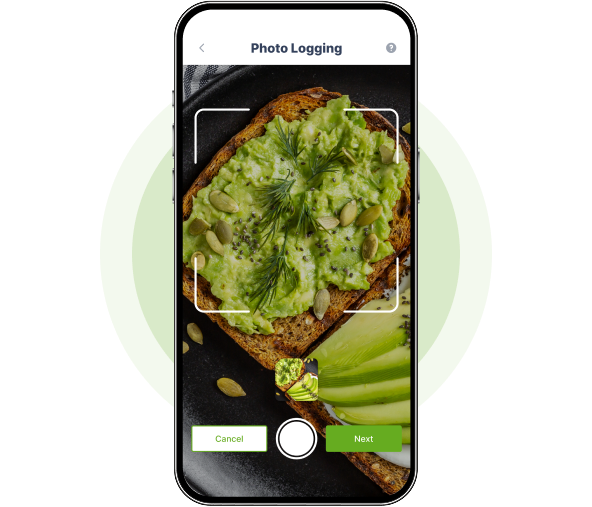
Avocado toast. Review the foods and portions before saving.
Personalize
Explore meal ideas that fit your preferences.
The application sends the preference. The response is the workflow you configured, for the member to review.
Act
- Avocado
- Bread
- Pumpkin seeds
Add ingredients from this meal to a shopping list.
Companies using Passio








See it, compare it, price it
Everything you need to decide before you talk to anyone.
Try it on your own food
A free demo account runs every route on your photos, voice and text, on any model, and shows the tokens each call used.
Get a demo account →Compare models with test results
Passio tests the models on each route and publishes accuracy, speed and tokens per call, with a Recommended, High quality and Budget pick.
See the results →Know what it will cost
Pick the features your app uses, the model for each, and your monthly users. See tokens per call, per month, and the lowest-cost plan.
Estimate your cost →What you can create
One platform for a product team and for a health or wellness program. The experience stays yours.
Food logging
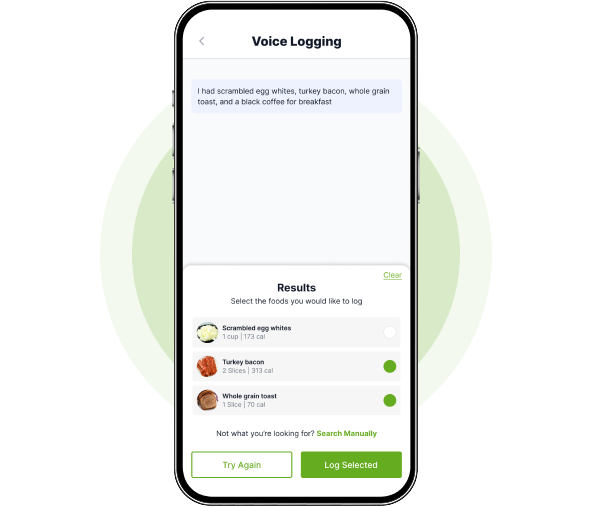
Photograph a meal, scan a barcode, speak, or search. Passio returns the foods as structured records for an application, a service, or a workflow.
Personalized guidance
The nutrition advisor, food ratings, and meal plans are API routes. Passio AI Studio is where a team sets the knowledge, tone, and workflow around them.
Recommendations and shopping
Return a substitute in the same context. In the United States, a separate call can turn a list into a tracked Instacart link. Passio does not complete checkout.
From a meal to a decision
Nutrition data is the start. The platform interprets it, applies the context you send, and returns something an application can act on.
1
Scan
A photo, barcode, nutrition label, voice note, or typed meal.
2
Understand
Foods, portions, and nutrients as structured records.
3
Decide
Guidance, a rating, menu picks, or a meal plan, using the context you send.
4
Act
A substitute, a US shopping link, or a result your application shows.
5
Learn
Your application reports what happened next. Passio does not change the workflow on its own.
Passio AI Studio configures the workflow
Passio AI Studio sits on the same account as the API. It is where a team shapes a nutrition workflow. It is not a general AI builder, and nutrition intelligence stays the core.
- What you configure
- Workflows, the knowledge they use, and custom endpoints when a standard route is not enough. On Growth and Pro, the model can be chosen per request.
- What the AI uses
- Recognized food, plus the goals, restrictions, and content your application sends with the request.
- What it produces
- Structured guidance, a plan, a rating, or the response shape of an endpoint you defined.
- How it connects
- Your application calls the API, an SDK, or the endpoint Passio AI Studio gives you. Publishing still takes that integration.
How Passio fits
Your company keeps the experience. Passio supplies food understanding, the AI that interprets it, and the workflow you configured.
Food input and the context your application, service or workflow already has
Food understanding, nutrition intelligence and configured workflow logic
Structured results your team displays, routes or acts on
Passio does not store patient records, complete checkout, or decide that a recommendation worked. Deployment limits are on the Trust page.
Live demo
Try every route on your own food, free.
The demo runs the real Nutrition AI API. Sign up, then photograph a meal, say what you ate, or search, and see what each call returns and costs.
- A page for every route: photo, voice and text logging, search, barcode, the advisor, ratings, meal plans and shopping.
- Switch the model on any route and see how the answer and the cost change.
- See the exact request, response and tokens of every call.
- Already a customer? Sign in with your API key; calls run on, and bill, your own account.
What will you build with Passio?
Create an account to get an API key and Passio AI Studio. Every plan includes every route.